Understanding iOS: The Powerful Software Behind Your Apple Devices
If you own an iPhone or iPad, you're interacting daily with iOS, Apple's sophisticated mobile operating system. Initially conceived as the "iPhone Operating System" (hence the original acronym), iOS has evolved significantly since its debut in 2007. Today, it serves as the foundational software for iPhones, iPads, and even iPod touch devices, providing a seamless and intuitive user experience across Apple's mobile ecosystem.
iOS is much more than just a background process; it's the core engine that powers every function of your device. It manages everything from making phone calls and sending messages to running advanced applications and ensuring robust security. Built-in apps like Mail, Camera, Safari, Maps, and many more are all integral components of the iOS framework, working together to deliver a cohesive and powerful mobile computing experience. It's the essential software that brings your device to life, offering a distinct environment compared to other operating systems like Apple's macOS for computers or watchOS for Apple Watches, and the open-source Android OS used by a multitude of other smartphone manufacturers.
Why Knowing Your iOS Version Matters: Security, Features, and Compatibility
You might be wondering, "What iOS are we on?" Beyond simple curiosity, understanding which version of iOS your iPhone or iPad is running is surprisingly important for several reasons. Apple consistently releases updates for iOS, and each new iteration typically brings a host of improvements, new features, and crucial security enhancements. Here’s why staying informed is key:
- Access to the Latest Features: New iOS versions often introduce exciting new functionalities, user interface refinements, and enhancements to core apps. For instance, recent major updates have brought advancements in areas like personalized lock screens, enhanced privacy controls, or even sophisticated AI-driven features like "Apple Intelligence," offering a vastly improved user experience. To fully take advantage of these innovations, you'll need a compatible and updated iOS version.
- Enhanced Security: This is perhaps the most critical reason. Every software program, no matter how well-developed, can have vulnerabilities. Apple's regular iOS updates are designed to patch these security flaws, protecting your personal data and your device from potential threats. Running an outdated iOS version can leave your device exposed to known exploits, making it a prime target for malicious actors.
- App Compatibility: Many third-party applications require a minimum iOS version to function correctly, or even to install at all. If you're struggling to download a new app or find that an existing one isn't working as expected, an outdated iOS version could be the culprit. Developers often build their apps to leverage the latest iOS APIs and features, making older versions incompatible.
- Optimized Performance and Bug Fixes: Updates aren't just about new features; they also focus on optimizing performance, improving battery life, and fixing various bugs and glitches that users might have encountered in previous versions. This can lead to a smoother, more reliable experience for your device.
- Troubleshooting and Support: When seeking technical support for your device or an app, one of the first questions you'll be asked is usually, "What iOS version are you running?" Knowing this information can significantly speed up the troubleshooting process and help support staff provide more accurate solutions.
To dive deeper into the significance of keeping your software current, check out our guide on What's the Latest iOS? Why Your iPhone Version Matters.
Quick Steps: How to Check What iOS You're On
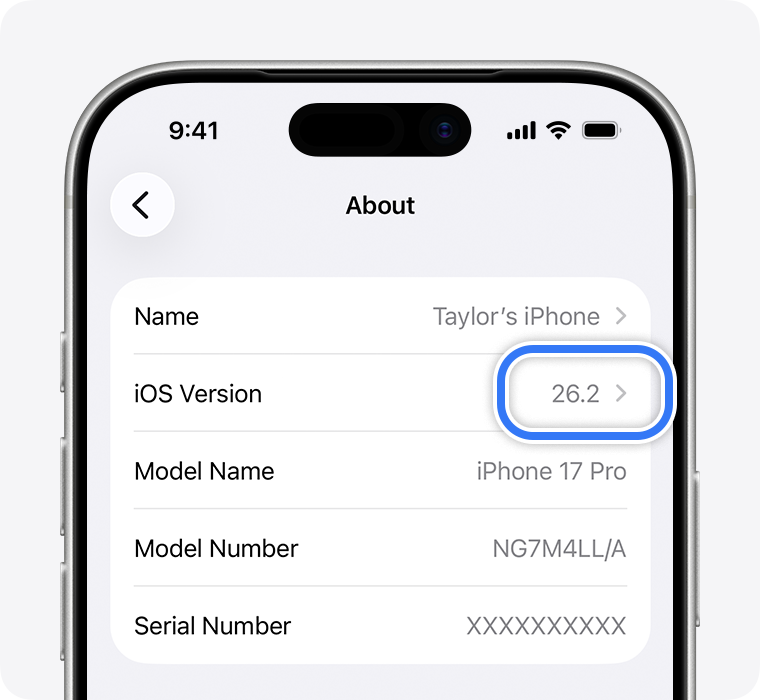
Finding out which iOS version your device is running is a straightforward process that takes mere seconds. Whether you're preparing for an update, troubleshooting an app, or simply curious, here’s how to quickly determine what iOS you're on:
- Open the Settings App: Look for the grey gear icon on your home screen and tap it.
- Navigate to General: Scroll down the list of settings and tap on "General."
- Tap on About: Within the General settings, you'll see "About" at the very top. Tap this option.
- Locate "Software Version": On the "About" screen, you'll find a wealth of information about your device. Look for the entry labeled "Software Version." The number displayed next to it is your current iOS version.
For example, you might see "iOS 17.5.1" or "iOS 18.0". The first number (e.g., 17 or 18) indicates the primary major version of the operating system. The numbers following the periods (e.g., .5.1 or .0) represent minor updates, bug fixes, and security patches released since the major version's initial launch. It's always a good idea to ensure you have the latest minor update for your major iOS version to benefit from all improvements.
Beyond Checking: Understanding iOS Updates and Device Compatibility
Once you know what iOS you're on, the next logical step might be to consider updating. Apple continuously refines iOS, and typically, new major versions are released annually, bringing significant overhauls and features. These updates are generally a positive thing, addressing bugs, enhancing performance, and introducing exciting new capabilities.
How to Update Your iOS
Updating your iOS is usually a simple process, typically found under `Settings > General > Software Update`. However, it's crucial to prepare properly: always back up your device before starting a major software update to prevent any potential data loss. Ensure your device is connected to a power source and a stable Wi-Fi network.
Device Compatibility: Not All Devices Are Equal
While Apple strives to support older devices for as long as possible, not every iPhone or iPad can run the very latest version of iOS. Each new iOS iteration often requires more powerful hardware, particularly a newer A-series chip, to handle its advanced features and computational demands. For example, if we consider a hypothetical future release like iOS 26 (as referenced in some advanced discussions about Apple's roadmap), it might necessitate an iPhone equipped with an A12 Bionic chip or later. This means devices like the iPhone XR, XS, and XS Max, while still capable and functional, might eventually lose support for the newest major iOS versions.
Conversely, many contemporary devices are well-equipped to handle modern iOS updates. For instance, devices from the iPhone 11 series all the way through the latest iPhone 17 and 18 models (including Pro, Max, and Plus variants, and even the SE 2nd gen and newer) are typically compatible with recent and forthcoming major iOS releases, ensuring users can enjoy the full suite of new features and security enhancements for years to come.
Understanding which features are available on your device and how to get the most out of your software version is vital. For comprehensive information on upgrading and ensuring your device can support the latest features, refer to our iPhone iOS Guide: Check Compatibility & Get New Features.
Conclusion
Knowing what iOS you're on is a fundamental aspect of owning an iPhone or iPad. It empowers you to understand your device's capabilities, its security posture, and its compatibility with the latest apps and accessories. While Apple regularly introduces exciting new features with each major update, the consistent flow of minor updates and security patches is equally vital for maintaining a secure and smoothly operating device.
Checking your iOS version is a quick, three-tap process, and it's a piece of information that can save you time and frustration when troubleshooting or seeking support. By staying informed and keeping your device updated when possible, you ensure that you're always getting the best, most secure, and most feature-rich experience Apple has to offer. So, take a moment now to check your device – it's a small step that makes a big difference in your digital life.